Fpa2027 Judging
Fpa2027 is the FPA’s real-time judging system. This page explains how the system works and how freestylejudge.com works out the scores.
To try it yourself, open the Judging Trainer (sign in first). See The Judging Trainer below.
The system
- Three categories, each with its own judges: Difficulty, Artistic Impression and Execution. A pool usually has one or more judges per category.
- Judges take notes in real time with buttons while the routine plays, on their phone or tablet. Most of the judging happens during the routine, not after it.
- When the routine ends, the notes become a graph for each category, and the computer works out a baseline estimate of the score from them.
- The judge compares their impression with the graph and can adjust the estimate. The computer only suggests; the judge may submit any score.
- Each team’s graphs are shown together so teams can be compared, and the other judges’ graphs are overlaid so a judge sees everyone’s opinion before submitting.
- Each judge submits one score. A team’s scores are added together, and the team with the most points wins.
The notes
Difficulty: two steps
The judge taps a numberline (with move names on it) for how hard the move was, then rates how well it was done: Bad, Average or Good. The note is timed at the tap.
Artistic Impression: three areas
- Teamwork: Minor, Decent, Great
- Music: Decent, Great
- Form: Bad, Good
Execution: penalties and cleanliness
Large Error, Medium Error, Minor Error, Average Completion, Clean Completion.
The judge’s screens
Each judge has two tabs: Play for taking notes while the routine runs, and Review for every team in the pool. The timer at the top right runs from the routine’s start.
Play: taking notes
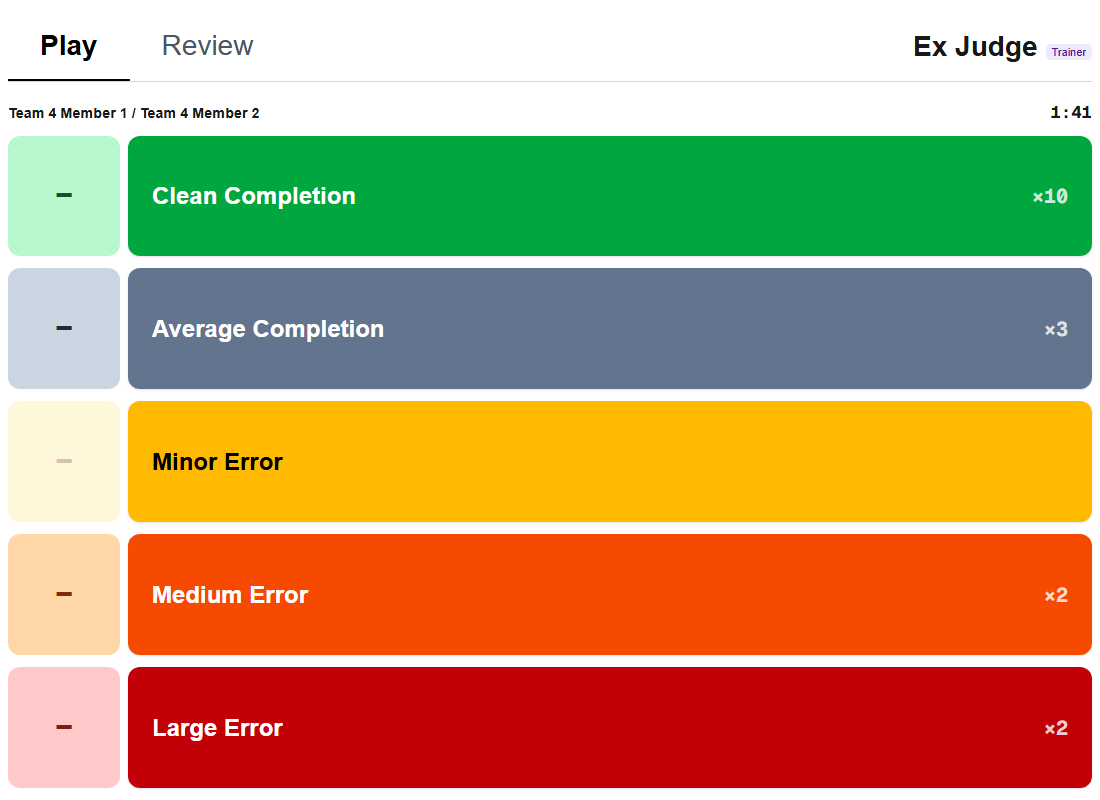
Execution. Tap a button each time it happens; the count shows on the button and the − beside it removes the latest one. The team and the routine’s time are along the top.
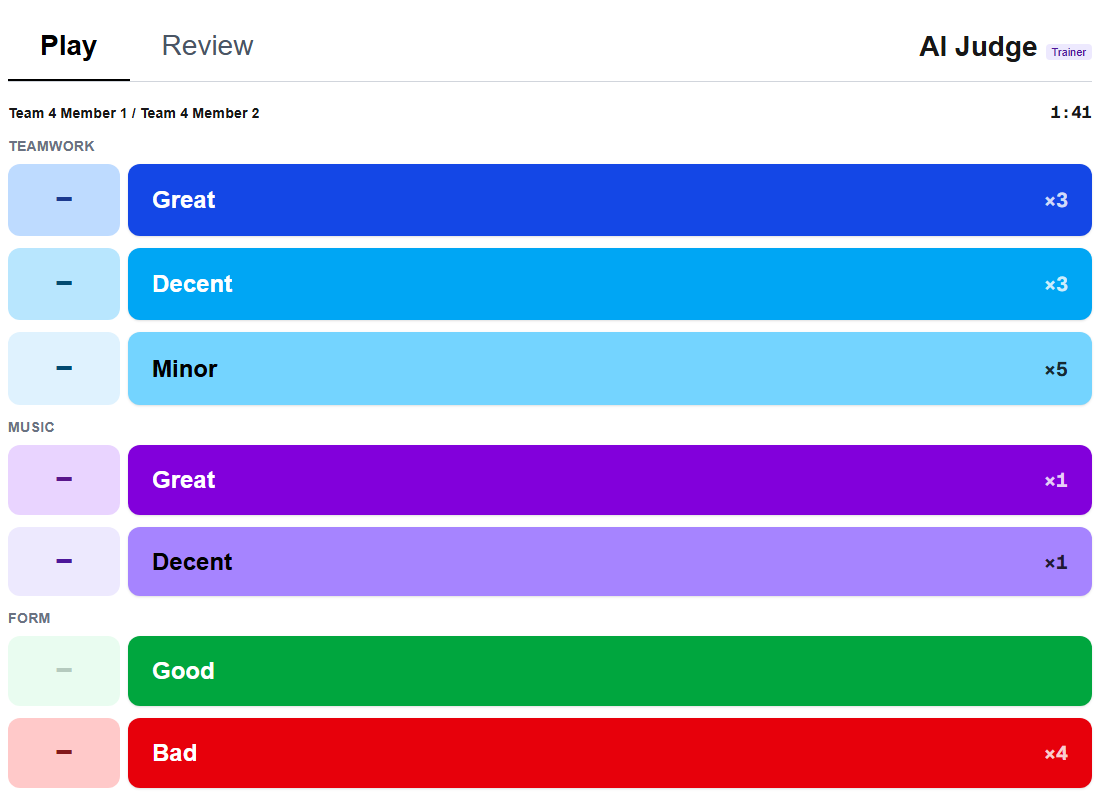
Artistic Impression, with its buttons under Teamwork, Music and Form.
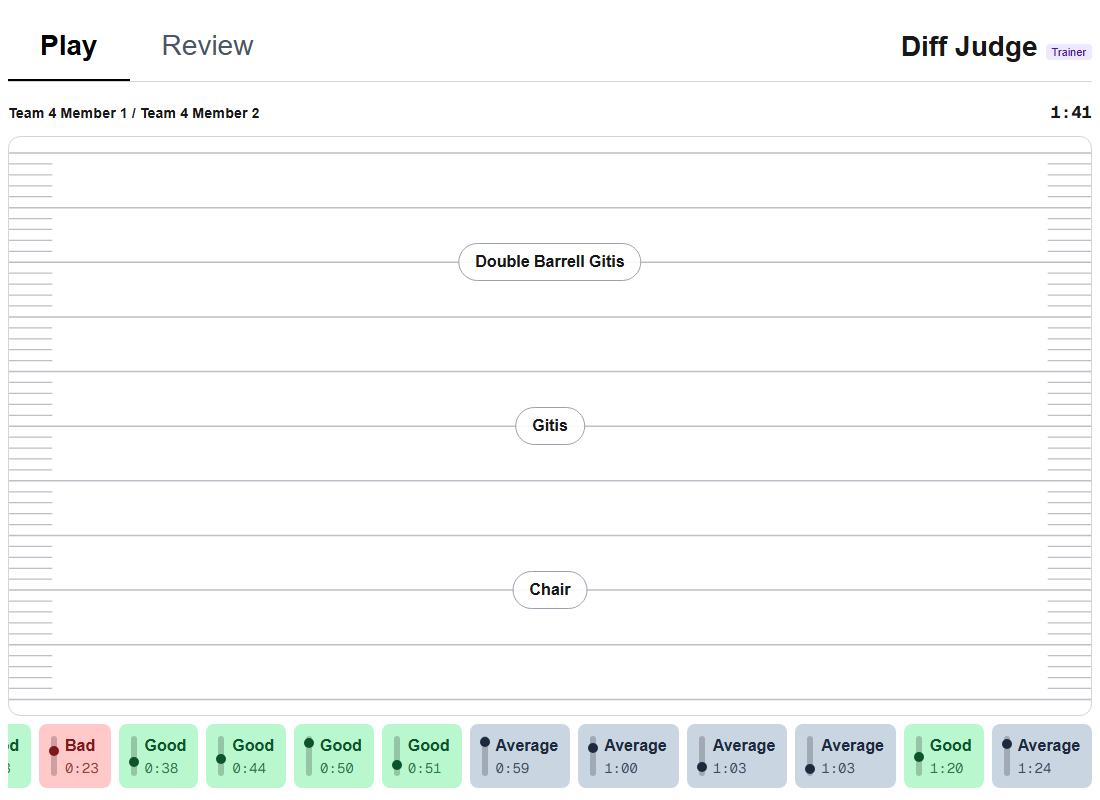
Difficulty. Tap the numberline at the move’s difficulty, then rate it. Each note shows in the row below with its rating and time; tap one to move, re-rate or delete it.
Enter Score
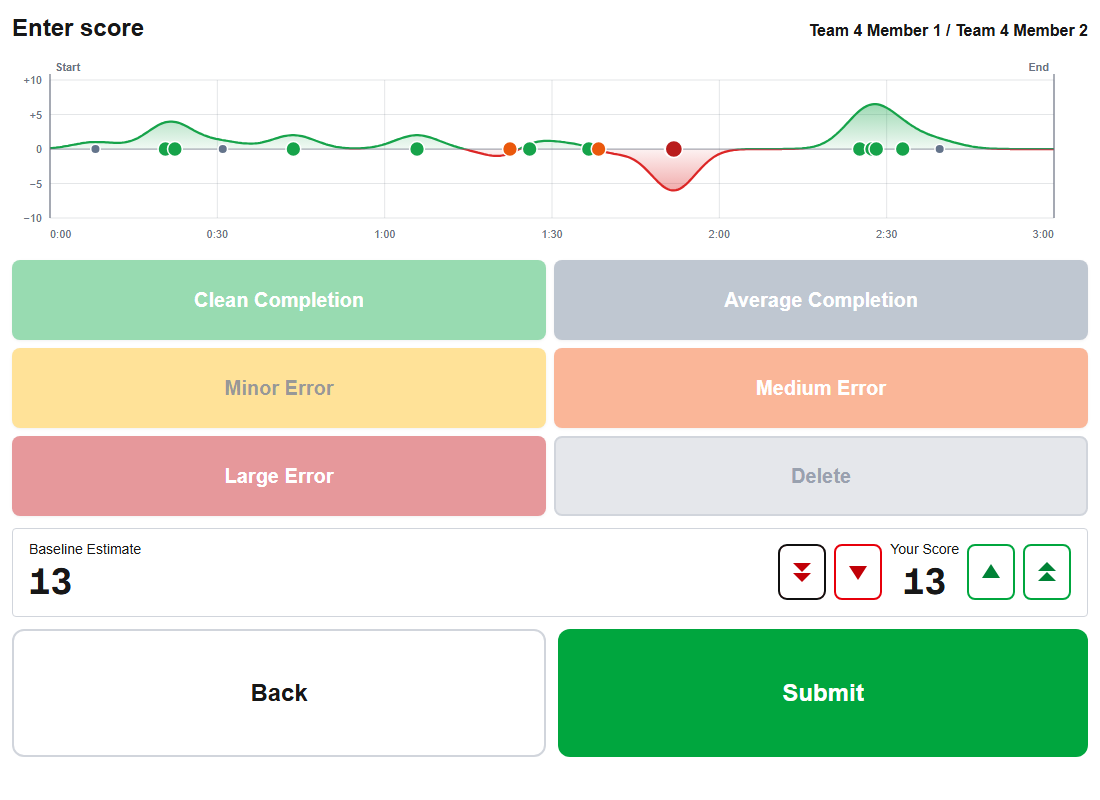
When the routine’s time is up, a big Enter Score button appears at the top of the screen and opens this: the notes as a graph, the buttons to add or fix notes, the Baseline Estimate, and the arrows that adjust Your Score before Submit.
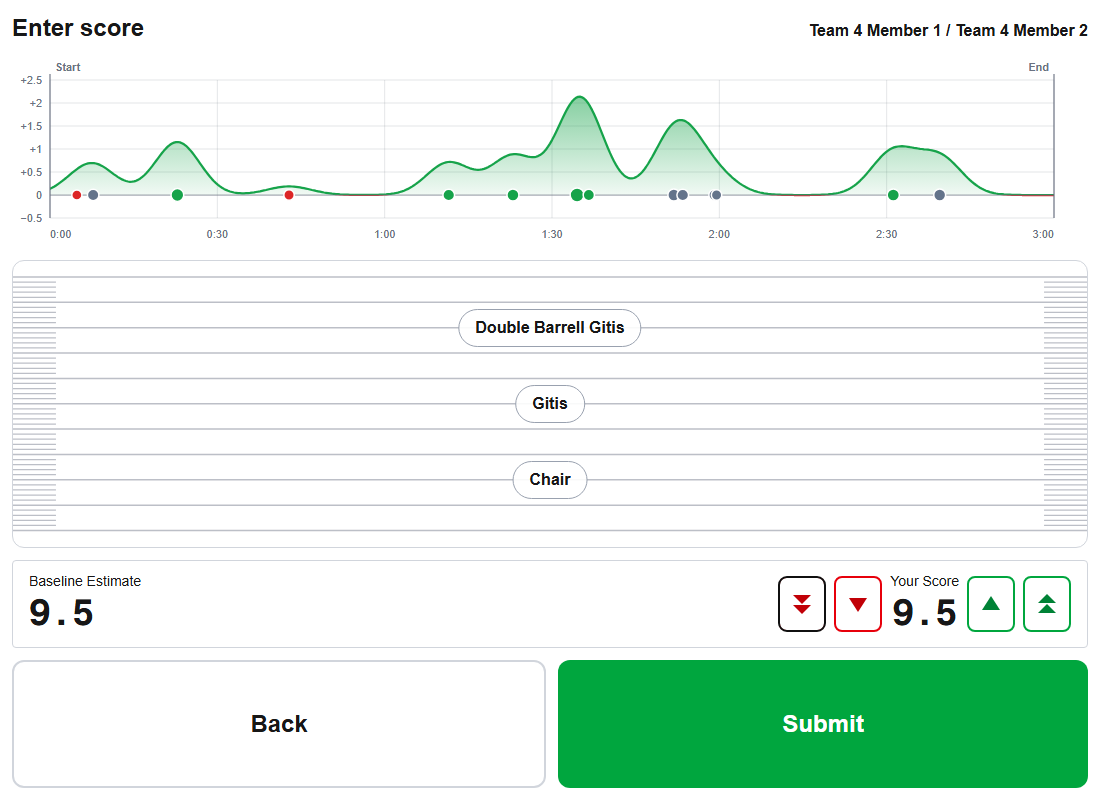
The same for Difficulty, with the numberline under the graph.
- Notes can still be added, moved or deleted from the score dialog until the score is submitted. Once submitted, that routine’s notes are locked.
- The faint lines under a judge’s own graph are the other categories’ judges, averaged per category, so a judge can see how the others saw the same routine.
Review: every team
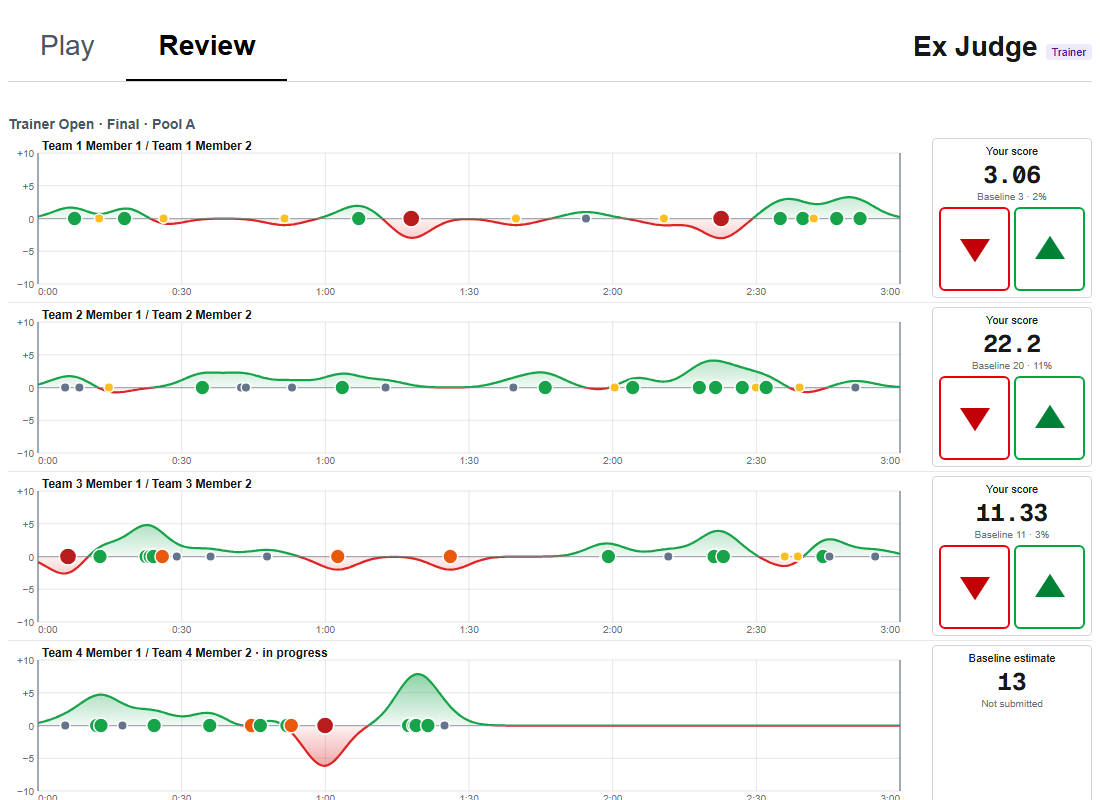
Each team as a graph with its score beside it. An earlier score can be changed here with the arrows; the routine still running shows its estimate until it is submitted.
- Review lists the earlier teams, the current one, and the teams still to play as empty graphs.
- Changing an earlier score from Review keeps its baseline as it was; only the percent changes.
- A team that never got started can be given a backup score from Review.
How the app scores it
This is what the app does with its default settings. A head judge can change them for one event on the Head Judge’s Settings tab (and save them as a preset), so a real event may use different numbers. The Judging Trainer always uses the defaults.
What each note is worth
| Execution | Points |
|---|---|
| Clean Completion | +2 |
| Average Completion | +1 |
| Minor Error | −1 |
| Medium Error | −2 |
| Large Error | −3 |
| Artistic Impression | Points |
|---|---|
| Teamwork Great / Decent / Minor | +3 / +2 / +1 |
| Music Great / Decent | +2 / +1 |
| Form Good / Bad | +1 / −1 |
Difficulty: the numberline runs from 0 at the bottom to 3 points at the top, with Chair at 0.6, Gitis at 1.5 and Double Barrell Gitis at 2.4. A note is worth where it was tapped × the rating’s multiplier: Good ×2, Average ×1, Bad ×0.3. A well-done Gitis is 1.5 × 2 = 3 points.
The limit on positive notes
- Execution and Difficulty count at most one positive note per 15 seconds of routine: 4 a minute, so 12 in a 3:00 routine. Artistic Impression has no limit.
- If a judge takes more than that, the most valuable positive notes count, wherever they are in the routine (equal ones: the earlier first). The rest are dropped: still shown on the graph, but grayed out and left out of the baseline. Every Difficulty note is positive, even a Bad one, so Bad moves are usually the first dropped.
- Negative notes (Execution’s errors) always count.
- So taking more notes than the limit doesn’t raise a score. What raises it is better notes: harder moves done well, or clean completions instead of average ones.
The graph
Every note adds a smooth bell-shaped bump at its moment (about 4 seconds wide). The line is all the bumps added together, so notes close together stack into a tall hill and notes far apart stay separate. Above zero is green, below is red.
The baseline estimate
- Execution and Artistic Impression: the worth of every note added up. Timing doesn’t matter.
- Difficulty: the area under the whole graph, scaled so each note counts its own points. The area runs past the start and end, so when a note was taken doesn’t matter: it is the notes’ points added up.
- Only the notes within the limit above count.
- Rounded to 1 decimal.
Results
- Per team: each judge’s score, a total per category, and the team total (all scores added, rounded to 2 decimals).
- Place by team total, highest first. Equal totals share a place (two 2nds, then 4th). No score yet, no place.
- A team played more than once (judges scoring one at a time, as in the Judging Trainer) counts each judge’s newest score. A cancelled routine doesn’t count.
- The graphs show each category’s judges averaged into one line, and every team’s line together.
- Per category, a table shows each judge’s note counts (or Difficulty’s numberline / rating pairs), baseline and score.
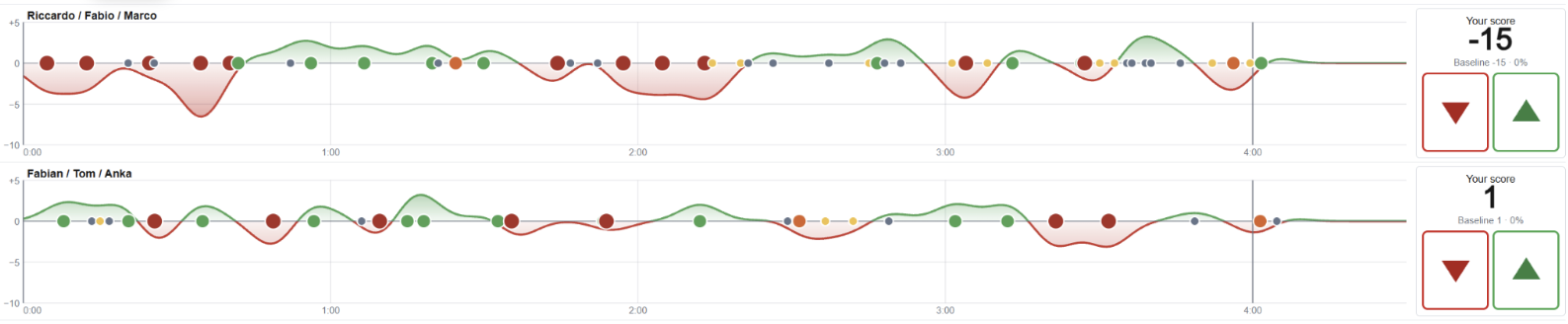
Teams side by side: the same time axis for each, so a judge can see how one routine compares with another before settling the scores.
How the code works
- Live event. The head judge starts a routine; each judge’s screen polls the server, taps are saved as notes (
fpa2027_judge_notes) with their time, and are kept in the browser until the server has them. - Enter Score. At the routine’s length the screen draws the graph and the estimate (
score-curve.ts). On Submit the server works the baseline out again from the saved notes with the same code (judging-estimate.ts) and stores it with the percent and score (fpa2027_judge_scores), so the stored number is the one the judge saw. - Other judges’ lines come from the server already averaged per category (
judging-curves.ts): one judge’s notes are never sent to another. - Results add the scores up and rank the teams (
pool-standings.ts), the same numbers the Head Judge, the public results page and Discord show. - The Judging Trainer runs the same screens and the same maths, but keeps the notes and scores in the browser instead of the database (
judging-trainer.ts). Nobody else sees them.
The Judging Trainer
A practice pool played only in your browser: nothing is saved to the server, and other people can’t see it. The pool has 8 teams and 3 judges: Diff Judge, AI Judge and Ex Judge. You play the head judge and all three judges.
The dark bar at the top:
- New test event: clears every note and score and puts all 8 teams back to unplayed.
- Start Guide: the page the trainer opens on, explaining how to use it.
- Diff Judge, AI Judge, Ex Judge: switch to that judge’s real screen, at any time.
- FPA2027 Description: a summary of the judging system and how the app scores it.
- Results: the pool’s full results, as the head judge sees them. This is where routines are started.
- End early: stops the running routine now, so its judge’s Enter Score comes up straight away instead of after the full 3:00.
Starting a routine: in the Results Summary table, each judge’s score cell for each team has a Start button until that judge has a score for that team. Start plays that team’s routine for that judge (3:00, unless ended early) and opens that judge’s screen, so each team is judged three times, once per judge. While a routine is running the other Start buttons wait; the running one’s cell says Judging…, then Enter score to go back to it. Once the score is submitted, the cell shows the score.
A good way to practice: open Results, press Start under one judge for Team 1, take that judge’s notes, press End early (or wait for 3:00), press Enter Score and submit, then come back to Results for the next judge or team, and watch the totals and places fill in.